This is one of the simple yet confusing topics in networking. It took me 1 full week just to understand it. But once I got it, other networking topics started to feel easier and make more sense.
So, when you're trying to fix high CPU on a router or wondering why your packets are moving slowly, you’re actually staring at one of the most overlooked and fundamental concepts in networking: how packets are switched.
In this post, we'll dive in on process switching, then compare it with Cisco Express Forwarding (CEF), and why you should care.
🧩 What is Process Switching?
Process switching is the original, old way routers used to forward packets. Every time a packet arrives, the router hands it to the CPU, which then performs a full lookup:
- Consults the routing table (RIB) and ARP table to obtain the next-hop router’s IP and MAC address, and outgoing interface.
- Overwrites the L2 destination MAC address with the next-hop router’s MAC address, and source MAC with the MAC of router’s egress interface.
- Decrement the IP TTL field.
- Recomputes the IP header checksum.
- Finally, deliver the packet.
All of this happens inside the CPU using the ip_input process, every single time.
🧨 When Does Process Switching Happen?
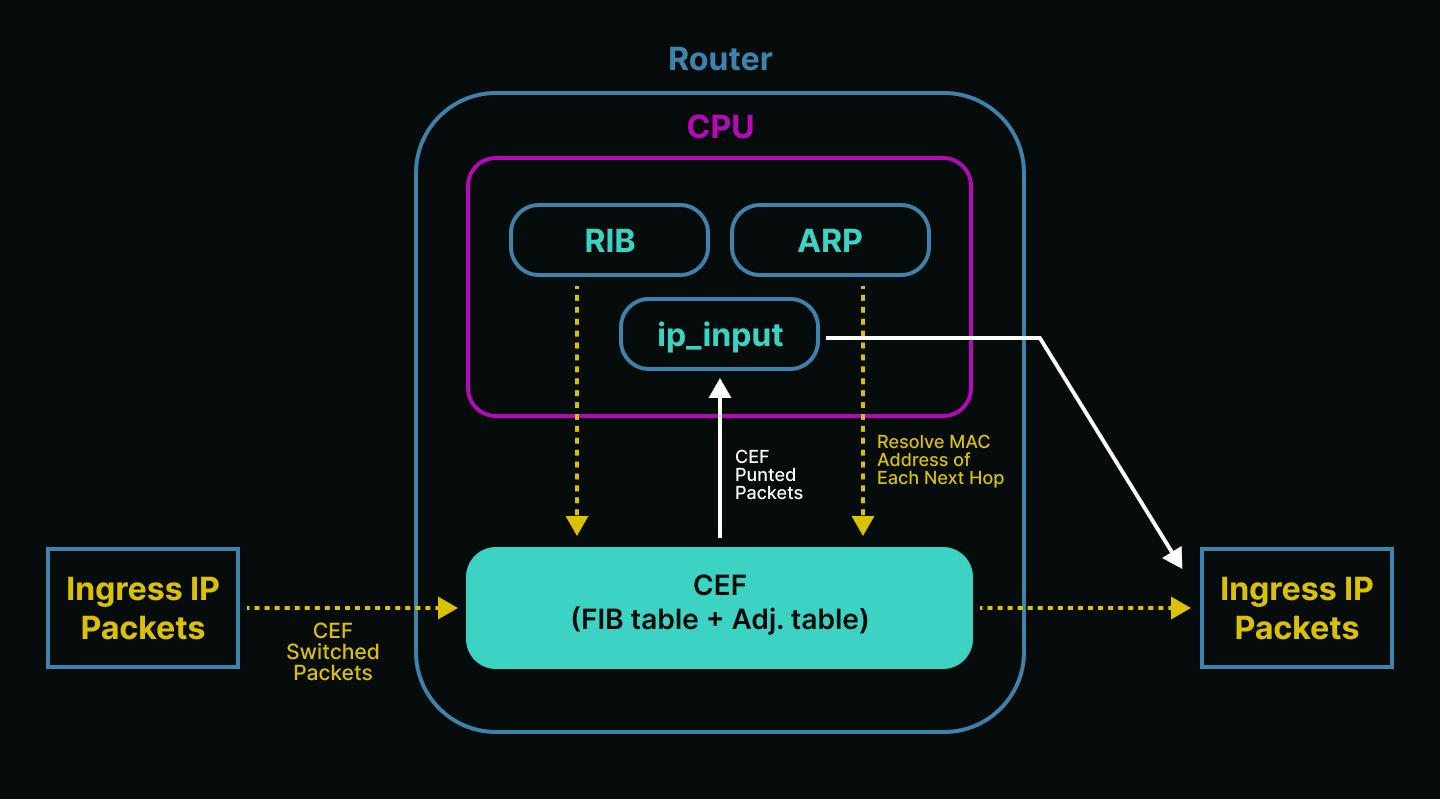
Even in modern networks that already use CEF, process switching isn’t dead. It still handles special packet types that can’t be fast switched (called punted packets):
- Packets sourced or destined to the router itself (BGP updates, pings to the router).
- Packets that are too complex for hardware to handle (IP packets with IP options).
- Packets requiring extra info that’s not currently known (Unresolved ARP entries).
- When CEF is disabled, misconfigured, or overwhelmed.
Process switching is basically the fallback when CEF can't do its job. It is slow and overwhelming the CPU.
Think of process switching as the head chef that knows everything about the recipe to cook. But if you give all the orders to him alone, it will be painfully slow and inefficient. That’s why we need more chefs to help him, it’s CEF (Cisco Express Forwarding).
⚡ Enter: Cisco Express Forwarding (CEF)
Cisco came up with CEF to fix the inefficiencies of process switching. CEF is a high performance switching method where all forwarding decisions are precomputed and saved, no more calculations per packet that will overwhelm the CPU.
Imagine a head chef who creates a set of SOPs (Standard Operating Procedures), so the other chefs can help him cook faster. As long as the customer orders something listed in the SOP, the other chefs (CEF) can handle it quickly.
But if a customer asks for something not in the SOP, the chefs don’t know what to do. So they pass the order back to the head chef (fallback to process switching).
CEF has two key components:
- FIB (Forwarding Information Base): stores the mirror of the forwarding information in the routing table (RIB). When there’s a change in the network topology or routing, the RIB gets updated. These changes are then applied to the FIB too. CEF uses the FIB to decide how to forward packets based on the destination IP prefix.
- Adjacency Table: stores Layer 2 info like MAC addresses and outgoing interfaces, built from ARP.
With CEF, your router does the computing once, then just forward each incoming packet instantly.
But when something changes in the network, like a new route or link failure, the routing table (RIB) updates. Then, the router uses the CPU to do a new packet lookup (recomputing) and builds a new CEF.
So, if you ever see high CPU usage on your router with the process called ip input, it usually means the router is doing a full lookup. Likely because the network just changed and CEF hasn’t updated yet.

🧠 Centralized vs Distributed Forwarding
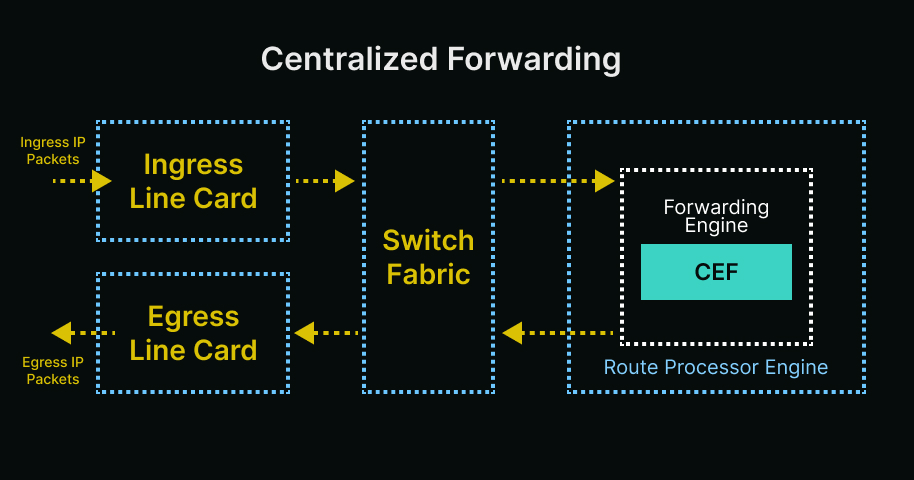
In centralized forwarding, packets arrive at the ingress line card, then forward it to switch fabric, and continue to the route processor to do the forwarding decision where CEF is located. After that the RP (route processor) decides to forward the packet.
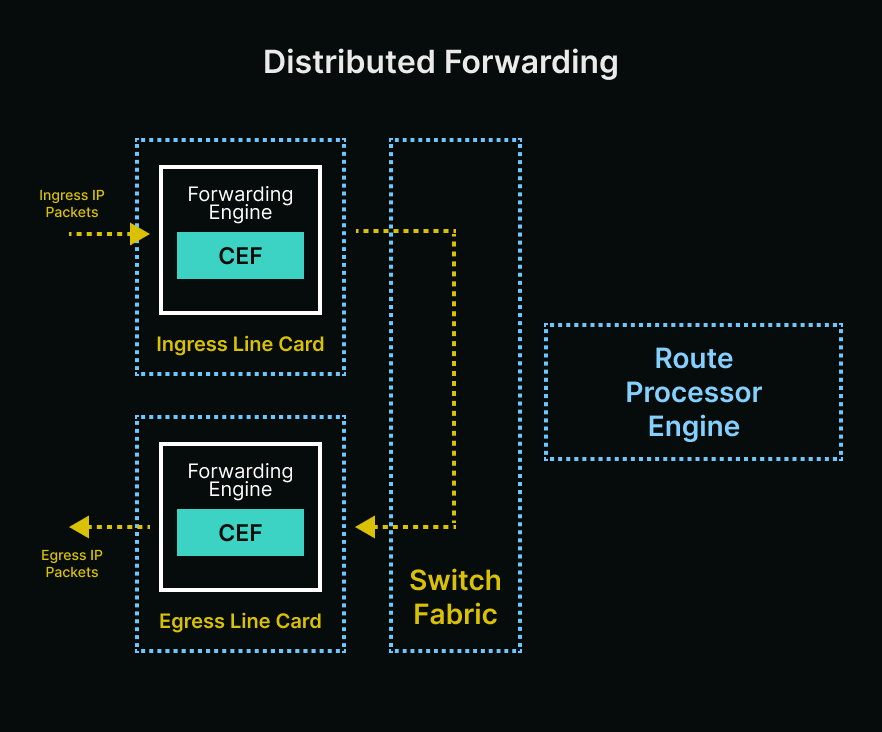
For distributed forwarding, the forwarding decision is distributed into the line cards because the forwarding engine with CEF distributed (get copied) to every line card. The CEF table is still built by the RP, but it’s downloaded to each line card to independently make decisions to forward packets.
So, a packet received on the ingress line card will be transmitted to the local forwarding engine on that line card. The forwarding engine will perform lookup and determine if egress interface is in local or in different line cards. If the egress interface is in different line cards, it will send the packet across switch fabric or backplane, directly to the egress line card bypassing the RP.
To summarize and make it simple, what is centralized and distributed? It’s the forwarding decision. Either centralized within the RP, or distributed to every line card independently.
🖧 Software CEF vs Hardware CEF
From this way, many people will get confused with the difference between software and hardware CEF vs centralized and distributed forwarding, so did I. Are they the same?
The easy way for me is, think about what routers do is build the CEF table, which consists of the FIB and adjacency table.
Once the CEF table is built:
- On software routers, CEF stays in the RP CPU and is used to forward packets.
- On hardware routers, CEF copied into the ASIC line cards for high speed forwarding.
Pretty much the same as centralized and distributed forwarding, right?
While they may seem similar, centralized/distributed refers to where the forwarding decision happens, while software/hardware CEF refers to what type of component (CPU or ASIC) does the forwarding.
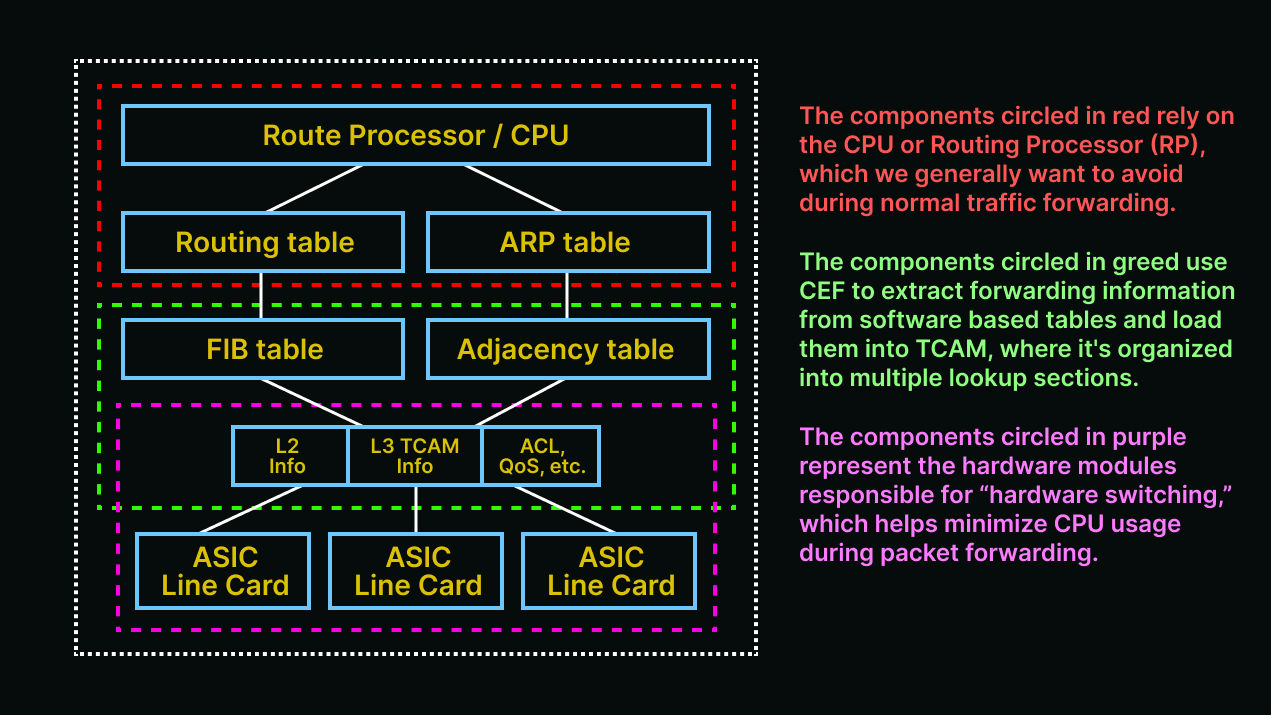
Look again at the diagram.
Software CEF shares control & data plane, it uses RP CPU for forwarding decisions. Whether hardware CEF has separated control & data plane, it uses ASICs for forwarding decisions.
ASICs designed specifically to move packets (the data plane), while RP manages control plane and only moves packets the ASIC can’t, using process switching (punted packets).
So, the CPU in hardware based platforms is not used for packet switching, but to program the hardware CEF. Unlike the CPU in software based platforms that are used for packet switching.
💻 Packet Forwarding in Software-Based Platforms vs Process Switching
Wait, did I just say CPU in software based platforms (or software CEF) used for packet switching? Is it just the same as process switching ip_input which uses CPU too? Does it make the CPU high then?
This is another confusion that I had before, and if you have it too...thank you. Means you’re reading this article till this line, appreciate it.
What’s the difference between ip_input and CEF in software-based routers?
In ip_input (process switching), each packet arrived is handled one-by-one by the CPU/RP. For every packet, the router does:
- Look up the destination in the RIB.
- Resolves next-hop and layer 2 header.
- Builds the packet again and forwards it.
This is very CPU intensive, especially under heavy traffic. Usually used for exceptions, or when CEF is disabled.
For CEF, it builds the FIB & adjacency table in the CPU first. When a packet arrives, the router doesn’t “think” anymore, it just reads the answer from the FIB and forwards it. Even in software CEF that also uses CPU, but the CPU only does the thinking once, so it is much faster than process switching.
Think of it like a cached result, instead of recalculating the route for every packet that arrives and rewriting the headers per packet, the CPU just grabs the answer from FIB.
🗄️ Ternary Content Addressable Memory (TCAM)
When talking about distributed platform or hardware CEF, we also need to understand 1 critical component inside of it, TCAM.
It’s a special type of high speed memory used in routers and switches to search large tables very quickly, especially for routing, ACL, QoS. Unlike regular CAM which finds data by address, TCAM looks for data by content and it does it in parallel across all entries, making it extremely fast.
The “ternary” part means it supports 3 values:
- 0
- 1
- X -> “don’t care” or wildcard, which is key for matching prefixes or ranges (IP subnets, ACLs).
How TCAM differs form CAM:
- CAM will do matching by exact match (0 or 1), while TCAM supports 0, 1, and “don’t care” (X).
- CAM used for MAC address tables, while TCAM used for routing, ACLs, and QoS.
- CAM is limited in flexibility, while TCAM is highly flexible (wildcard matching).
TCAM limitations:
- Expensive, compared to standard memory.
- Higher power consumption than other memory types.
- Limited size, only small amount of TCAM space per device or line card.
Hence routers may “run out of TCAM” if there are too many ACL entries or routes, and this is why optimizing ACLs or route summarization matters.
🧬 How TCAM is used in Routers or Switches
1. Routing Lookups:
- Matches IP prefixes (10.0.0.0/8) quickly.
- Uses longest prefix match logic.
- TCAM enables fast FIB lookups in hardware.
2. Access Control Lists:
- TCAM allows wildcard matches, it can match rules like “permit tcp from 192.168.0.0/16 to any on port 80”.
- It can match source/destination IP, port, and protocol in a single TCAM entry.
3. QoS Policies:
- Matches traffic types based on multiple fields.
- Enables hardware to apply shaping/marking at line rate performance.
⚡ Is TCAM only used in Hardware Based Platforms?
Yes, TCAM is not used in software CEF. It’s only used in hardware based CEF / distributed forwarding.
Software CEF:
- Relies on the CPU and standard RAM for forwarding.
- No need for TCAM, because the CPU can just do lookup tables using traditional processing (slower, but flexible).
Hardware CEF:
- The forwarding decision is distributed to ASICs on line cards.
- ASIC uses TCAM for fast parallel lookups like prefix matching (routing), ACL, QoS classification.
- TCAM enables line rate performance (full speed of the port 10G, 40G, 100G, etc.) without needing CPU intervention.
- This will allow for ACLs to process at the same speed regardless of whether there are 50 or 500 entries.
To wrap up this discussion, I’ll share one image that sums up distributed forwarding or hardware CEF and TCAM in a simple way.